
To split a food delivery order, give each person the price of what they ordered, split anything you shared, and then share the extras: the delivery fee, the service fee, tax and the tip. The simplest fair rule is to share the extras in proportion to what each person ordered; it also works when someone only orders a drink. The bill splitter works it out to the cent.
How to split a delivery order, step by step
- Before you order, agree who pays at checkout and how the others pay them back.
- From the receipt, write down each person’s items at the menu price. Split anything shared between the people who actually had it.
- Add up the extras: delivery fee, service fee, any small order fee, tax and tip. Use the tax amount on the receipt rather than working out your own rate.
- Share the extras by what each person ordered (or equally, if the orders cost about the same) and add each person’s share to their food.
- Check that the amounts add up to the total on the receipt, then send everyone their number.
How to split the delivery fee, service fee, tax and tip
The fees are not all the same kind of cost. On DoorDash, for example, the delivery fee is a fixed amount per order set by each restaurant, while in some places the service fee is a percentage of the subtotal, 15% for most orders (DoorDash). Tax is also worked out from the subtotal.
| Extra | Fair way to share it |
|---|---|
| Delivery fee, small order fee | Equally: one fee for the whole order |
| Service fee, tax | By what each person ordered, as they grow with the subtotal |
| Tip | Equally, or by what each ordered; agree before you order |
Splitting each fee its own way is the most exact, but one rule is easier to keep: share all the extras by what each person ordered. When the orders cost about the same, it gives almost the same answer as equal shares; when they don’t, it is fairer. The worked example shows how far apart the methods land.
Worked example: four friends, one order
Ana, Ben, Chloe and Dan order dinner to their flat. Ana has a burrito bowl at 18.50 USD, Ben ramen at 24.00, Chloe a salad at 12.00 and Dan a pizza at 21.50. They share fries at 6.00, so the food comes to 82.00. The extras are a 3.99 delivery fee, a 12.30 service fee, 6.56 tax and a 10.00 tip: 32.85 in all, for a total of 114.85 USD.
| Person | Equally | Fees equally | Fees by order |
|---|---|---|---|
| Ana | 28.72 | 28.22 | 28.01 |
| Ben | 28.71 | 33.71 | 35.72 |
| Chloe | 28.71 | 21.71 | 18.91 |
| Dan | 28.71 | 31.21 | 32.21 |
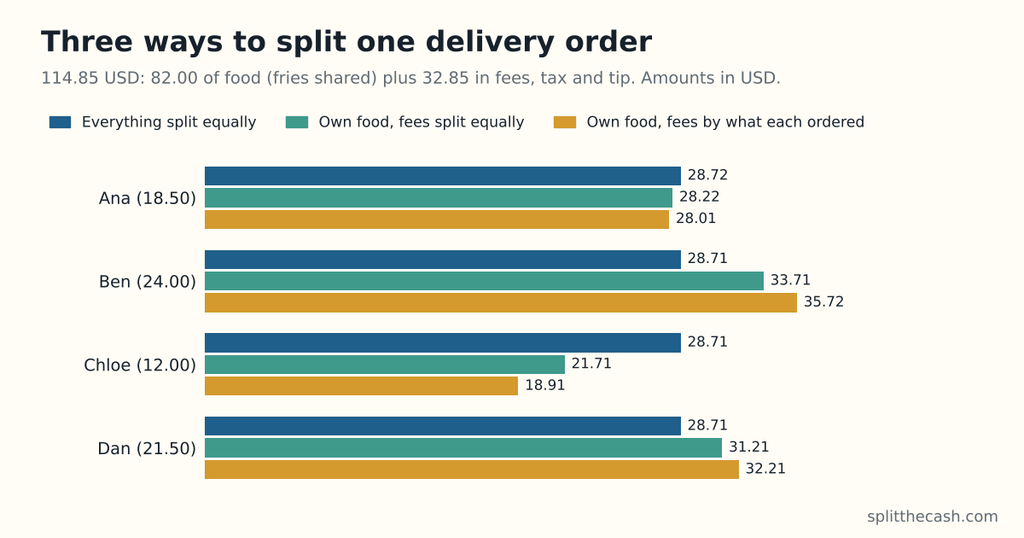
“Equally” splits the whole 114.85 four ways. The other two give each person their own food plus 1.50 for the fries, then share the 32.85 of extras equally (8.21 or 8.22 each) or by what each person’s food came to. All three add up to 114.85. Split everything equally, Chloe pays 28.71: 7.00 more than her own food plus an equal share of the extras (21.71), because her salad is the cheapest order.
A shortcut for sharing the extras by order: divide the total charged by the food total, 114.85 ÷ 82.00 = 1.4006, and multiply each person’s food by it. Ana’s 20.00 (her 18.50 plus 1.50 of fries) becomes 28.01, and Ben’s 25.50 becomes 35.72. It only works when every extra is shared by order.
Try it with your own order
Enter each person’s items and tap who had them; leave an item untapped if everyone shared it. Put the delivery fee, service fee, tax and tip together in “Tip (amount)”, and keep “Share tax and tip” on “By what each person had”, or switch it to “Equally”. Leave “Tax or service charge %” at 0, since the tax is already in that amount.
Rules to agree once
Most arguments start when the rules are made up after the receipt arrives. If you order together often, agree these once and pin them in the group chat:
- Everyone pays for their own food; shared items are split between the people who had them.
- Fees, tax and tip are shared by what each person ordered (or equally, if you prefer).
- The tip is a set amount or percentage, agreed before ordering.
- Discounts come off the food they apply to; a discount on the whole order is shared like the fees.
- Whoever orders pays up front and is paid back the same day.
Common questions
Can you split an Uber Eats order?
Yes, with a group order. Since 2022, the person who starts a group order can choose to pay for everyone or have each person pay for their own items, and all the food arrives together (Uber). Uber’s announcement doesn’t say how the delivery and service fees are shared in that case, so check the checkout screen before you order.
Can you split a DoorDash order?
DoorDash’s help page for group orders describes one checkout, done by the person who started the order, after everyone has added their items through a shared link (DoorDash). Its guide for business accounts has an “Everyone Pays Separately” option (DoorDash for business); we found no such option described for personal accounts. Otherwise, one person pays and the others pay them back.
Who pays the delivery fee in a group order?
Everyone who ordered, in equal shares, is the usual fair answer: there is one delivery for the whole group. A shared order can also avoid a small order fee, which DoorDash may charge when the subtotal is below a set amount (DoorDash).
How do you split the tip?
Agree before you order. Equal shares are simplest; shares by what each person ordered suit a group where one order is much bigger. On DoorDash, the whole tip goes to the driver (DoorDash).
What if someone only ordered a drink?
Then sharing the extras equally makes them pay as much in fees as the person who ordered a full meal. Shared by what each person ordered, their share of the extras is small, in line with their drink, with no special rule. Or agree that they pay a smaller, fixed amount; the pay-what-you-can calculator handles a limit like that.
How do you split a promo code or free delivery?
By what it takes off. A percentage off the food comes off each person’s items. A fixed amount off the whole order is shared like the fees, by what each person ordered. A free-delivery code simply removes the delivery fee from the extras. In the calculator, enter the prices after a food discount, and take a whole-order discount off the amount in “Tip (amount)”.
What if we add an item just to reach the minimum order?
If one person wanted it, it goes on their bill. If it was added only to reach the minimum, treat it as shared and split it between everyone. A small order fee charged instead is one of the extras, shared with the rest.
How do you split a restaurant bill with tax and tip?
The same way: each person’s dishes, the shared ones split, then tax and tip on top, equally or by what each had. The restaurant bill splitter does it item by item or as a total plus extras, and who pays at a birthday dinner covers treating someone.